
本頁內容尚未翻譯。
Symfonium is able to connect to the majority of Subsonic-compatible servers, including Navidrome, as well as all OpenSubsonic servers. This allows users to play, cast, and offline cache music directly from their servers.
Since each Subsonic-compatible server implements different variations of the API, Symfonium offers several options to adapt to these differences. However, OpenSubsonic servers have helped to mitigate this issue. If your server is not currently OpenSubsonic-compatible, you can ask the server author to consider joining the OpenSubsonic project: GitHub - opensubsonic/open-subsonic-api: Repository hosting the definition and discussions of the Open Subsonic API · GitHub.
Add provider
Section titled “Add provider”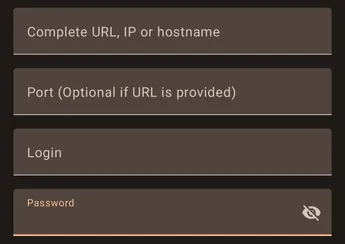
The wizard support many ways to enter your provider information to be able to connect and will try to figure out the proper parameters.
- Full url
You should enter the full connection url in the URL field.

In that case the field port must be left empty.
- IP and Port
Or you can just enter the IP and port of the provider and Symfonium will try to figure out the rest.
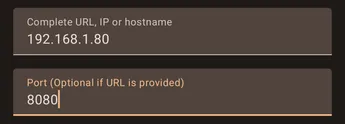
The port field, when filled, takes precedence over any port in the URL field.
As a reminder http port is 80 and https port is 443.
See below for the settings already available in the add provider wizard.
Support
Section titled “Support”
If you have problems configuring your provider press the Enable button in the support card, then try again to add your host.

After Symfonium shows the error message, press the send button to open your email client with attached logs and write a message so that I can help you.
All settings
Section titled “All settings”To access all available settings for a provider, edit the provider after it has been added. (Settings → Manage media providers: [Wiki] Settings - Manage media providers)
Wifi only
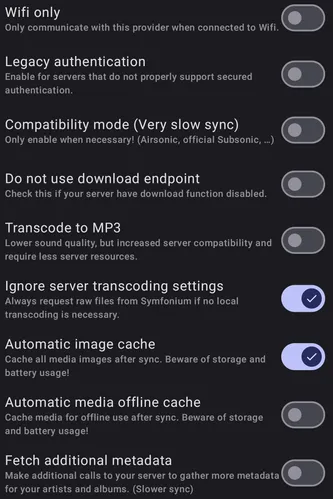
Section titled “Wifi only”Enable this option to prevent Symfonium from accessing the server when not connected to Wi-Fi.
Legacy authentication
Section titled “Legacy authentication”This setting is necessary for older servers, or in cases where the Ampache provider or LDAP accounts are being used.
Compatibility mode
Section titled “Compatibility mode”This setting is required for servers that do not support the search3 endpoint with empty queries, especially in the case of Official Subsonic or Airsonic[-Advanced]. Symfonium is an advanced offline-first application that requires database sync. If the servers are not fixed, slow mode is mandatory. However, most providers have now fixed their implementation to support this. If your server requires this option, please contact me so that I can convince the team behind your provider to fix their side.
Do not use download endpoint
Section titled “Do not use download endpoint”When in compatibility mode, Symfonium uses the download endpoint, which is usually more stable. However, some servers may have this option disabled. If you encounter this issue, please check this option
Transcode to MP3
Section titled “Transcode to MP3”Enabling this option will make Symfonium transcode to MP3 instead of OPUS. This may be useful for servers that do not support OPUS or for those who prefer MP3 over OPUS. However, it’s worth noting that OPUS generally offers better sound quality at lower bitrates compared to MP3. Transcoding to OPUS may increase server resource usage compared to transcoding to MP3.
Ignore server transcoding settings
Section titled “Ignore server transcoding settings”Enabling this option in Symfonium will ensure that the app requests the raw audio files from the server when there is no need for local transcoding. This can improve the audio quality and reduce the strain on the server’s resources as it does not have to perform transcoding.
Automatic image cache
Section titled “Automatic image cache”Enabling this option will cache all media images locally on your device after each sync. However, it can also use up storage space on your device and potentially drain your battery faster if you have a large library with many images. It’s recommended to use this option if you have enough storage space available on your device and don’t mind the potential battery drain. If you have limited storage or battery life, it may be better to disable this option.
Automatic media offline cache
Section titled “Automatic media offline cache”Enabling this option will cache all media files for offline usage after sync, allowing you to play your music even when you are not connected to the internet. However, this may consume a lot of storage and battery usage, so it is important to consider this before enabling this option.
Fetch additional metadata
Section titled “Fetch additional metadata”This option allow additional calls to be made to your server to gather more metadata for your artists and albums. This includes information such as biographies, discographies, and images. Enabling these options can result in a slower sync process but can provide more complete and accurate metadata for your music. Additionally, these images may be used as a replacement for the images set up in your media tags. However, it’s important to note that enabling this option may result in increased data usage and slower sync.
Tested servers
Section titled “Tested servers”Symfonium is designed to be compatible with many servers, but there are some servers that are not recommended due to being outdated. If you are using a server that is not on the list of recommended servers or if you are publishing a new server, please contact us so that we can add it to the list.
Additionally, if you are developing a new server, we encourage you to join the OpenSubsonic community to help improve the API and ensure a bright future for Subsonic media providers. You can find more information on the OpenSubsonic GitHub page at GitHub - opensubsonic/open-subsonic-api: Repository hosting the definition and discussions of the Open Subsonic API · GitHub.
Recommended servers
Section titled “Recommended servers”It is recommended to prefer OpenSubsonic servers as they offer more guarantee in implementing some necessary API improvements.
Those servers are actively maintained and support fast sync.
Servers implementing most OpenSubsonic extensions
Section titled “Servers implementing most OpenSubsonic extensions”- LMS - Lightweight Music Server (GitHub - epoupon/lms: Lightweight Music Server. Access your self-hosted music using a web interface. · GitHub) (requires legacy authentication) [Supports most OpenSubsonic additions]
- Navidrome: https://www.navidrome.org/ (use 0.51.1 or later)
- Gonic: GitHub - sentriz/gonic: music streaming server / free-software subsonic server API implementation · GitHub (use 0.21.0 or later)
Servers not yet implementing all OpenSubsonic extensions
Section titled “Servers not yet implementing all OpenSubsonic extensions”- Funkwhale: https://funkwhale.audio/ (Some issues currently being fixed by them)
- Ampache: https://ampache.org/ (requires legacy authentication. If you are not using a recent nightly, compatibility mode is also required)
- Astiga: https://asti.ga/ (requires compatibility mode before Symfonium 3.2.0)
Not recommended servers
Section titled “Not recommended servers”The following servers are outdated and do not support fast sync. Avoid them if your library is large.
- Subsonic: http://www.subsonic.org/ (requires compatibility mode - no longer maintained, not recommended)
- Airsonic: GitHub - airsonic-advanced/airsonic-advanced · GitHub (requires compatibility mode - no longer maintained, not recommended)
- Jpsonic: GitHub - jpsonic/jpsonic: Media server with excellent for multibyte languages · GitHub (requires compatibility mode. It is maintained, but the developer does not want faster syncs. You can try asking again.)