
本頁內容尚未翻譯。
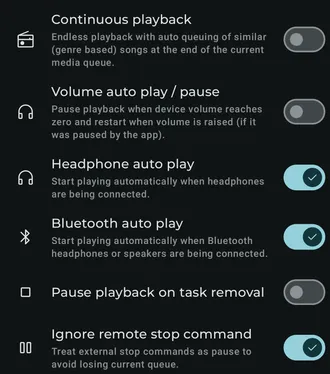
Available settings
Section titled “Available settings”Volume auto play / pause
Section titled “Volume auto play / pause”Pause playback when device volume reaches zero, then restart it when the volume is raised if Symfonium performed the pause.
Headphone auto play
Section titled “Headphone auto play”Start playback automatically when headphones are connected.
Bluetooth auto play
Section titled “Bluetooth auto play”Start playback automatically when Bluetooth headphones or speakers are connected. This requires Bluetooth permission.
Pause playback on task removal
Section titled “Pause playback on task removal”Pause playback when Symfonium’s task is removed from Android. Some devices may trigger task removal unexpectedly.
Keep paused state on skips
Section titled “Keep paused state on skips”When playback is paused, do not start it automatically after pressing Previous or Next.
Stop repeat one on skips
Section titled “Stop repeat one on skips”Switch to repeat all when you skip manually while repeat one is enabled.
Ignore remote stop command
Section titled “Ignore remote stop command”Treat an external Stop command as Pause so the current queue is retained. This can help with cars that send Stop when they disconnect.
Related pages
Section titled “Related pages”Smart queue and Smart flowUnderstand Symfonium Smart Queue and Smart Flow, including how automatic queue generation chooses and updates playback.