
此内容尚不支持你的语言。
Symfonium offers many different ways to cache the media from your providers for offline usage.
You can use the simple Save to Downloads folder to export media from your provider for usage from other applications .
Or you you can use all the offline cache options to allow offline playback and listing of your media.
Specific media cache (Manual or automatic)
Section titled “Specific media cache (Manual or automatic)”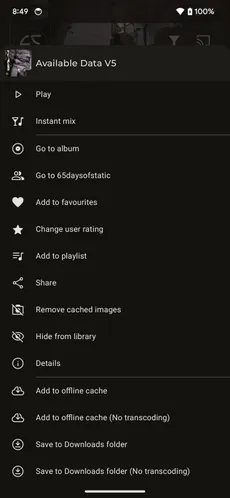

You can offline cache songs, albums, artists, genres, playlist … from the 3 dots menu then offline cache option. You can also enable automatic offline cache for genre / artists or playlist (including smart playlists) so that each time new content is added to those on your provider the new content is also automatically cached.
If you enable offline cache transcoding in the settings then the menu will offer options to cache or download with or without transcoding.
If you want to export the files to share with other applications, you can use the save to Downloads folder. But please note that those media won’t be usable by Symfonium in offline mode properly.
Automatic media provider sync
Section titled “Automatic media provider sync”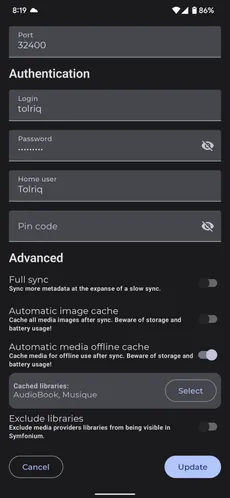
You can edit your added media provider and configure auto sync, either the whole provider media or selected media librairies.
Transcoding and storage location
Section titled “Transcoding and storage location”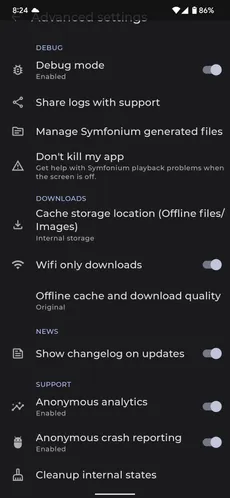
In Settings > Offline, cache and download > General, you can change the cache storage location. If your provider supports transcoding, the same settings page lets you configure the offline quality to reduce the required storage space.