Symfonium supports smart playlists. They are dynamic playlists that present your media collection with your chosen filters and sort criteria. They are always up to date and do not require you to manually manage them.
You can, for example, create a Favorite smart playlist that will always contain all your favorited songs sorted by descending last played.
See Smart filters for how to create a smart filter and export it as a Smart playlist.
Once your smart playlist is created, you can edit it by pressing the edit button or selecting Edit smart playlist in the 3 dots menu.
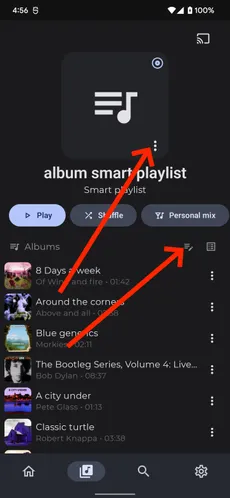
You can edit the smart playlist filter exactly as you’d edit a smart filter (Smart filters).
You can also configure the sort column and choose ascending or descending sort by clicking on the arrow.
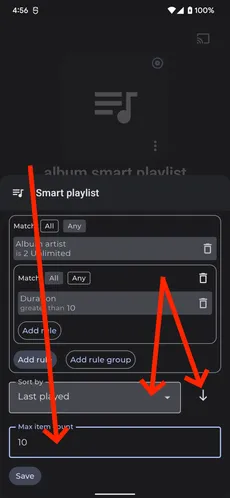
You can also apply limits to the number of items present in that playlist.