By default, when casting to Chromecast or UPnP/DLNA devices, Symfonium generates URLs from your provider configuration so the renderer can stream media directly from the server.
DNS issues
Section titled “DNS issues”This can cause issues with complex DNS or split-network setups, because the renderer opens the generated URL itself. Chromecast devices use hard-coded DNS servers, and UPnP/DLNA renderers may use their own DNS or network configuration. Use hostnames and servers that your renderer can resolve and reach directly. Otherwise, enable proxy mode as described below.
Proxy media
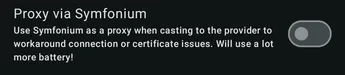
Section titled “Proxy media”If you use a VPN or another network setup where only your phone can access your server, enable proxy mode so media goes from your server to your phone, then from your phone to your renderer.
In the cast bottom sheet, press the settings button next to your renderer.

Then enable Proxy via Symfonium.