
Available settings
Section titled “Available settings”Extract local files waveforms
Section titled “Extract local files waveforms”Analyze local files to extract waveform data shown during playback.
Extract server files waveforms (Wi-Fi only)
Section titled “Extract server files waveforms (Wi-Fi only)”Analyze server and cloud files while connected to Wi-Fi to extract waveform data.
Extract server files waveforms (Always)
Section titled “Extract server files waveforms (Always)”Analyze server and cloud files on any connection. This can use a large amount of mobile data. When enabled, it replaces the Wi-Fi-only option.
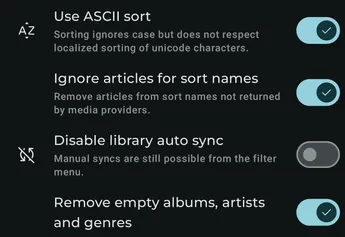
Use ASCII sort
Section titled “Use ASCII sort”Use case-insensitive sorting that does not follow localized Unicode sorting rules.
Ignore articles for sort names
Section titled “Ignore articles for sort names”Remove articles from generated sort names when a media provider does not return its own sort names.
Only update play counts for track artists
Section titled “Only update play counts for track artists”Control whether album artists and composers are included when updating track-artist play counts.
Album play count mode
Section titled “Album play count mode”Choose whether an album’s play count is calculated from the average, total, or lowest play count of its tracks.
Remove empty albums, artists and genres
Section titled “Remove empty albums, artists and genres”Remove an album, artist, or genre from the library after synchronization if it no longer has associated media.
Half star rating
Section titled “Half star rating”Allow half-star ratings. Providers that do not support them round the rating during synchronization.
Preferred scraping language
Section titled “Preferred scraping language”Choose the language used when scraping metadata. You may need to clear previously scraped provider data after changing it.
Disable library auto sync
Section titled “Disable library auto sync”Disable automatic library synchronization. Manual synchronization remains available from the filter menu; see Sync media provider data.
Strict playlist mapping
Section titled “Strict playlist mapping”Only match playlist tracks when their relative and absolute paths are respected.
Larger page size
Section titled “Larger page size”Load more data at once to improve the FastScroll indicator at the cost of additional memory use.