
Available settings
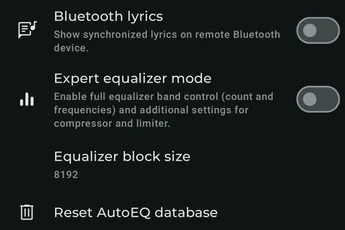
Section titled “Available settings”Bluetooth lyrics
Section titled “Bluetooth lyrics”Show synchronized lyrics on a remote Bluetooth device.
Expert equalizer mode
Section titled “Expert equalizer mode”Enable full equalizer-band control, including band count and frequencies, plus additional compressor and limiter settings.
Equalizer block size
Section titled “Equalizer block size”Control frequency resolution. Higher values can increase CPU use; reduce the value if audio skips.
Reset AutoEQ database
Section titled “Reset AutoEQ database”Clear the locally cached AutoEQ database so Symfonium downloads it again.
Handle USB audio connections
Section titled “Handle USB audio connections”Allow Symfonium to appear when Android detects a USB audio device. Disable this to prevent Android USB connection prompts when plugging in USB devices.
Always ask for USB permission
Section titled “Always ask for USB permission”Ask again when Symfonium opens and a connected USB DAC requires access.
Disable USB exclusive volume safety
Section titled “Disable USB exclusive volume safety”Allow USB exclusive playback to start even when Symfonium cannot verify or lower the USB DAC’s hardware volume. Use this cautiously.
Allow software volume in USB exclusive
Section titled “Allow software volume in USB exclusive”Use software PCM volume when USB exclusive playback cannot control DAC volume through USB or device-specific commands. This is ignored when processing is bypassed for the output.
Restart player on device change
Section titled “Restart player on device change”Reset the player after an output-device change to work around devices where equalization can otherwise produce no sound.
Never expose media session queue
Section titled “Never expose media session queue”Never publish the Now Playing queue to Android’s media session for other apps to consume.
Expose media session queue
Section titled “Expose media session queue”Always publish the Now Playing queue to Android’s media session. This option is hidden when Never expose media session queue is enabled.
Track number in media session
Section titled “Track number in media session”Include track numbers in media-session metadata. This may break external scrobblers.
Explicit symbols in media session
Section titled “Explicit symbols in media session”Include explicit-content symbols in media-session metadata. This may break external scrobblers.
Disable media session restoration
Section titled “Disable media session restoration”Delay media-session registration until playback starts. This may prevent an unwanted visible session but disables quick resume.
Default maximum number of tracks smart flow can insert
Section titled “Default maximum number of tracks smart flow can insert”Choose the default limit for tracks Smart Flow can add to a queue.
Force HTTP/1.1
Section titled “Force HTTP/1.1”Force HTTP/1.1 when playing to the local device.
Ignore offline server errors
Section titled “Ignore offline server errors”When a server goes offline, try to continue through the queue instead of pausing playback immediately.