
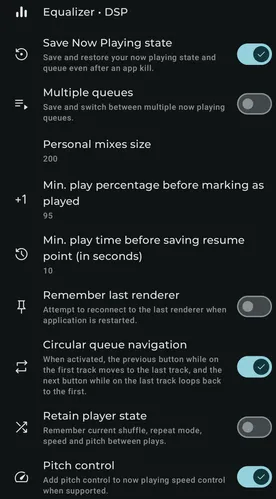
Available settings
Section titled “Available settings”Personal mixes size
Section titled “Personal mixes size”Choose how many items are queued when starting a personal mix.
Min. play percentage before marking as played
Section titled “Min. play percentage before marking as played”Choose the minimum playback percentage before Symfonium marks media as played. Some providers may ignore this value.
Min. play time before saving resume point (in seconds)
Section titled “Min. play time before saving resume point (in seconds)”Choose the minimum playback time before Symfonium saves a resume point. Select Never to disable saved resume positions. Some providers may ignore this value.
Audiobook resume rollback
Section titled “Audiobook resume rollback”When resuming an audiobook from a saved position, rewind by the configured amount before playback starts.
Max. play percentage to record skip count
Section titled “Max. play percentage to record skip count”Choose the maximum playback percentage at which skipping a track still increments its skip count.
Reduce last played updates
Section titled “Reduce last played updates”Update the last-played value only when media is marked as played.
Remember last renderer
Section titled “Remember last renderer”Attempt to reconnect to the last renderer after the application restarts.
Preserve “Play Next” order
Section titled “Preserve “Play Next” order”When adding multiple items with Play Next, place new items after existing Play Next items.
Sync volume on join
Section titled “Sync volume on join”When a Sonos device joins a group, set its volume to the group’s current level.
Automatic renderer reset
Section titled “Automatic renderer reset”Stop casting automatically when the current renderer goes offline.
Retain player state
Section titled “Retain player state”Keep the current shuffle, repeat, speed, and pitch settings between play actions.
Remember Smart flow mode
Section titled “Remember Smart flow mode”Apply the last selected Smart flow mode to newly created media queues.
Previous button rewind first
Section titled “Previous button rewind first”When the current track is not near its beginning, make the Previous button rewind it before moving to the prior track.
Circular queue navigation
Section titled “Circular queue navigation”Make Previous on the first track move to the last track, and Next on the last track move to the first.
Pitch control
Section titled “Pitch control”Add pitch control to the playback-speed panel when the active output supports it.