
Main page
Section titled “Main page”
General
Section titled “General”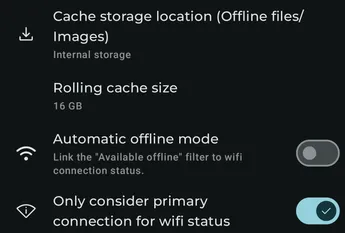
Cache storage location
Section titled “Cache storage location”If you have an external SD card, select where Symfonium stores offline media and its image cache.
Rolling cache size
Section titled “Rolling cache size”Enable a rolling cache with a maximum size. Symfonium removes the oldest files when the cache exceeds that size. The permanent offline cache remains available separately.
Automatic offline mode
Section titled “Automatic offline mode”Link the Available offline filter to Wi-Fi connection status so Symfonium can switch automatically into and out of offline mode.
Only consider primary connection for Wi-Fi status
Section titled “Only consider primary connection for Wi-Fi status”By default, Symfonium uses only the primary connection to determine Wi-Fi status. Disable this option if a VPN or WireGuard connection causes incorrect detection.
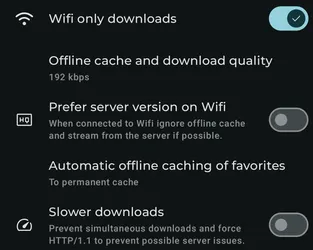
Wi-Fi only downloads
Section titled “Wi-Fi only downloads”Prevent offline downloads on mobile networks. This does not affect the playback cache.
Offline cache and download quality
Section titled “Offline cache and download quality”Choose the maximum bitrate used when a provider supports transcoded downloads.
Always prefer server version
Section titled “Always prefer server version”When connected to the server, stream from it instead of using an offline copy that was transcoded.
Prefer server version on Wi-Fi
Section titled “Prefer server version on Wi-Fi”When connected to Wi-Fi, ignore the offline cache and stream from the server when possible.
Automatic offline caching of favorites
Section titled “Automatic offline caching of favorites”Automatically cache media when you add it to favorites.
If the default offline quality is lower than the original, you can keep automatically cached favorites at original quality.
Max simultaneous downloads
Section titled “Max simultaneous downloads”Choose how many files Symfonium downloads at the same time.
Force HTTP/1.1
Section titled “Force HTTP/1.1”Force HTTP/1.1 for downloads to work around possible server or proxy issues.
Playback
Section titled “Playback”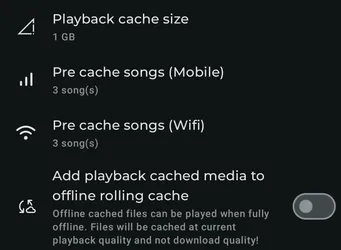
Playback cache size
Section titled “Playback cache size”Configure the maximum playback-cache size, including tracks pre-cached from the active queue. Android can purge this cache automatically; use the offline cache for persistent offline playback.
Pre-cache tracks (Mobile)
Section titled “Pre-cache tracks (Mobile)”Choose how many tracks from the Now Playing queue are pre-cached on a mobile connection.
Pre-cache tracks (Wi-Fi)
Section titled “Pre-cache tracks (Wi-Fi)”Choose how many tracks from the Now Playing queue are pre-cached on Wi-Fi.
Force first song pre-cache
Section titled “Force first song pre-cache”Finish pre-caching the first track before playback starts. This delays playback but ensures that the first track is cached.
Add playback cached media to offline rolling cache
Section titled “Add playback cached media to offline rolling cache”If rolling cache is enabled, automatically move media that was fully cached during playback into it.
Files keep the current playback quality rather than the configured download quality. A track transcoded to a lower bitrate on mobile therefore remains at that bitrate in the rolling cache.
Images
Section titled “Images”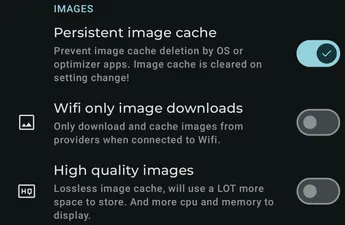
Persistent image cache
Section titled “Persistent image cache”By default, Symfonium stores provider images in its normal cache so the app or Android can reclaim them. Enable this option to keep images in persistent storage if an optimizer or device bug clears the normal cache too often, especially when you rely on offline mode.
Wi-Fi only image downloads
Section titled “Wi-Fi only image downloads”Do not download uncached images on mobile networks.
High quality images
Section titled “High quality images”Store cached images in a lossless format. This can improve quality slightly but uses considerably more storage.