
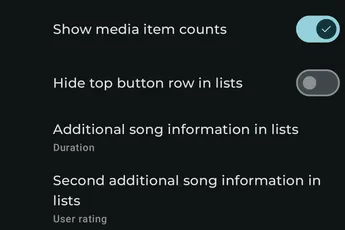
Available settings
Section titled “Available settings”Show media item counts
Section titled “Show media item counts”Display the number of items at the start of media lists.
Show smart filters as filter chips
Section titled “Show smart filters as filter chips”Display smart filters as chips in the filter bar.
Top button row style in lists
Section titled “Top button row style in lists”Choose how the quick-action row at the top of lists is displayed, or hide it.
Hidden top buttons
Section titled “Hidden top buttons”When the top button row is visible, select which actions it hides.
Inverted sort arrows
Section titled “Inverted sort arrows”Invert the direction represented by the ascending and descending sort arrows.
Hide back button in lists
Section titled “Hide back button in lists”Hide the Back button from media-list headers.
Always show filter bar in lists
Section titled “Always show filter bar in lists”Keep the filter bar visible instead of showing it only when needed.
Additional track information in lists
Section titled “Additional track information in lists”Choose the first additional value shown for tracks, such as rating, favorite status, or offline status.
Second additional track information in lists
Section titled “Second additional track information in lists”Choose a second additional value shown for tracks.
Center text in square grids
Section titled “Center text in square grids”Center item text when using a square-grid display style.
Make the text-only style single-line
Section titled “Make the text-only style single-line”Keep text-only list items on one line.
Show favorite status overlay
Section titled “Show favorite status overlay”Show favorite status as an overlay on media artwork.
Show offline status overlay
Section titled “Show offline status overlay”Show offline availability as an overlay on media artwork.
Track swipe right action
Section titled “Track swipe right action”Choose the action performed when a track is swiped to the right.
Track swipe left action
Section titled “Track swipe left action”Choose the action performed when a track is swiped to the left.
Long press starts multi-select
Section titled “Long press starts multi-select”Choose whether a long press starts multi-select or drag-and-drop.