
Skip to content

Settings - Playback - Decoding and transcoding


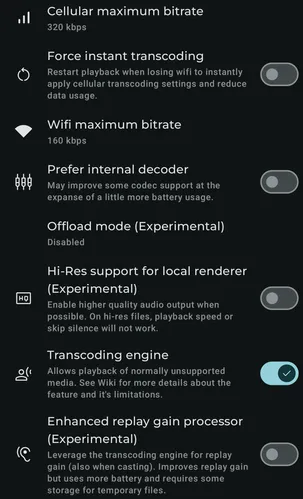
Settings - Playback - Decoding and transcoding screenshot 1

If your server supports it, limit the media bitrate when connected to a cellular network (transcoding).

When transcoding for cellular and losing Wi-Fi, instantly restart playback in transcoding mode to reduce network data usage.

If your server supports it, limit the media bitrate when connected to a Wi-Fi network (transcoding).

Prefer Symfonium’s internal decoder. This improves codec support and fixes a few device bugs, but can use a little more battery.

When using the device decoder, try to offload everything to the phone audio processor to reduce battery usage. On some devices, combined with the Hi-Res settings, this can bypass some phone sample rate limits.

On devices that support it, try to render media at higher quality when the source is higher quality. This disables a few audio processors, such as playback speed and skip silence.

Enable the internal transcoding engine to play more audio formats, such as DSD, MPC, and APE.

Leverage the transcoding engine for replay gain (also when casting). Improves replay gain but uses more battery and requires some storage for temporary files.