
Symfonium allows renderer-specific configuration. In the cast dialog, press the configure button.
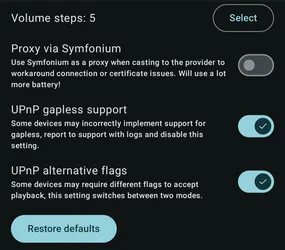
Volume steps
Section titled “Volume steps”Volume change applied by each button press (Now Playing buttons or hardware buttons when casting).
Proxy via Symfonium
Section titled “Proxy via Symfonium”Use Symfonium as a proxy when casting to work around connection or certificate issues. This uses a lot more battery.
UPnP gapless support
Section titled “UPnP gapless support”Some devices may incorrectly implement gapless support. Report the issue to support with logs and disable this setting.
UPnP alternative flags
Section titled “UPnP alternative flags”Some devices may require different flags to accept playback. This setting switches between two modes.
Note: The available settings depend on the renderer type. For example, UPnP settings do not apply to Chromecast.