
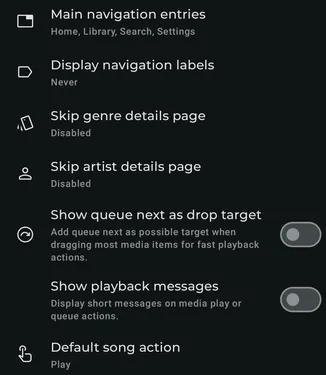
Available settings
Section titled “Available settings”Main navigation entries
Section titled “Main navigation entries”Choose and reorder the buttons of the main navigation tabs. If you remove the Settings button, it will be moved to the top button bar with the filter and the cast.
Portrait navigation style
Section titled “Portrait navigation style”Choose the navigation layout used in portrait orientation.
Landscape navigation style
Section titled “Landscape navigation style”Choose the navigation layout used in landscape orientation.
Bottom navigation background transparency
Section titled “Bottom navigation background transparency”Adjust the transparency of the bottom navigation background.
Full width
Section titled “Full width”When a floating-toolbar navigation style is selected, make the toolbar use the full available width.
Horizontal padding
Section titled “Horizontal padding”When the floating toolbar uses the full width, adjust its horizontal inset.
Display left menu navigation on the right
Section titled “Display left menu navigation on the right”Move left-side menu navigation to the right side.
Search button in top bar
Section titled “Search button in top bar”Show a Search button in the top bar.
Skip genre details page
Section titled “Skip genre details page”Choose whether selecting a genre opens its details, artists, albums, or tracks directly.
Skip artist details page
Section titled “Skip artist details page”Choose whether selecting an artist opens its details, albums, or tracks directly.
Show “Play next” as drop target
Section titled “Show “Play next” as drop target”Add Play next to the targets offered when dragging supported media.
Show “Add to playlist” as drop target
Section titled “Show “Add to playlist” as drop target”Add Add to playlist to the targets offered when dragging supported media.
Show playback messages
Section titled “Show playback messages”Display a short message after media play or queue actions.
Show slow media preparation messages
Section titled “Show slow media preparation messages”Display a short message when preparing media may take some time.
Default track action
Section titled “Default track action”Choose the default action when selecting a track.
Default audiobook track action
Section titled “Default audiobook track action”Choose the default action when selecting an audiobook track.
Default album click action in playlist
Section titled “Default album click action in playlist”Choose the default action when selecting an album inside a playlist.
Disable weighted shuffle
Section titled “Disable weighted shuffle”Use standard random shuffle instead of Symfonium’s weighted shuffle that reduces repetitions.
Expand player automatically
Section titled “Expand player automatically”Open the expanded player automatically when playback starts.