
Available settings
Section titled “Available settings”Header
Section titled “Header”Use the live preview to configure the album header. Controls include header size and background, animated artwork, blur and background protection, image size and position, margins, rounded artwork, title/subtitle/secondary-information placement and scale, action-button placement and style, header slot order, and Back-button visibility.
Album-specific header controls cover the favorite and More actions, album version, quality, user rating, artist position/style/scale, and button spacing.
Page content order
Section titled “Page content order”Choose the order of the Album page sections.
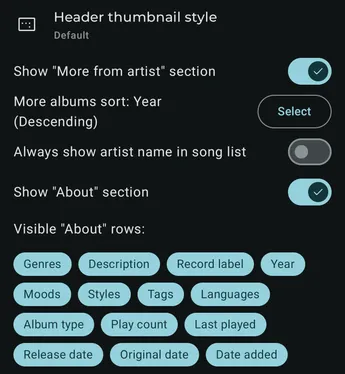
Show “More from artist” section
Section titled “Show “More from artist” section”Show or hide additional albums from the same artist.
More albums sort
Section titled “More albums sort”Choose the sort order for the More from artist section.
When this section is enabled, you can also configure its list or grid style, centered text, spacing, item size, and portrait and landscape column counts.
Always show artist name in track list
Section titled “Always show artist name in track list”Always show artist names in the track list. By default, Symfonium shows them only for compilations or when guest artists are present.
Only show distinct artist names in track list
Section titled “Only show distinct artist names in track list”Avoid repeating an artist name when it is the same as the album artist.
Show track number
Section titled “Show track number”Show track numbers in the album track list.
Group tracks by work
Section titled “Group tracks by work”Group classical tracks by their work metadata when available.
Show movement name and number instead of track title when available
Section titled “Show movement name and number instead of track title when available”For classical music, prefer movement metadata over the normal track title.
Show composer in track list
Section titled “Show composer in track list”Display composer information for each track.
Show individual track thumbnails
Section titled “Show individual track thumbnails”Display each track’s artwork instead of using only the album artwork.
Multiline track titles
Section titled “Multiline track titles”Allow track titles to use more than one line.
Show “About” section
Section titled “Show “About” section”Show or hide the album metadata section.
Show “About” title
Section titled “Show “About” title”Show or hide the section heading.
Clickable values style
Section titled “Clickable values style”Choose how clickable metadata values are displayed.
Single line rows
Section titled “Single line rows”Keep each About row on one line.
Manual order
Section titled “Manual order”Choose which About rows are visible and arrange their order.
Dynamic colors
Section titled “Dynamic colors”Choose whether and how the Album page derives colors from its artwork.